

Prepare 220-1102 Question Answers - 220-1102 Exam Dumps
Real CompTIA 220-1102 Exam Questions [Updated 2025]
NEW QUESTION # 234
A technician is troubleshooting a user's PC that is displaying pop-up windows, which are advertising free software downloads. When the technician tries to open a document, the system displays an error message that reads: Not enough memory to perform this operation. Which of the following should be the technician's next step to resolve this issue?
- A. Install antivirus software
- B. Install antispyware
- C. Reimage the system
- D. Disable the pop-up blocker
- E. Upgrade the browser
Answer: B
Explanation:
The presence of pop-up windows advertising free software and the error message about memory are indicative of spyware infection. Installing and running antispyware software is a practical first step to remove the unwanted software and resolve the issue without resorting to more drastic measures like re-imaging the system.
NEW QUESTION # 235
A technician receives a call from a user who is unable to open Outlook. The user states that Outlook worked fine yesterday, but the computer may have restarted sometime overnight. Which of the following is the MOST likely reason Outlook has stopped functioning?
- A. Malware infection
- B. Spam filter installation
- C. Operating system update
- D. Invalid registry settings
Answer: C
Explanation:
Operating system updates can sometimes cause compatibility issues with some applications, such as Outlook, that may prevent them from opening or working properly. This can happen if the update changes some system files or settings that Outlook relies on, or if the update conflicts with some Outlook add-ins or extensions. To fix this, the technician can try some of these troubleshooting steps:
* Start Outlook in safe mode and disable add-ins. Safe mode is a way of starting Outlook without any add-ins or extensions that may interfere with its functionality. To start Outlook in safe mode, press and hold the Ctrl key while clicking on the Outlook icon. You should see a message asking if you want to start Outlook in safe mode. Click Yes. If Outlook works fine in safe mode, it means one of the add-ins is causing the problem. To disable add-ins, go to File > Options > Add-ins. In the Manage drop-down list, select COM Add-ins and click Go. Uncheck any add-ins that you don't need and click OK. Restart Outlook normally and check if the issue is resolved4.
* Create a new Outlook profile. A profile is a set of settings and information that Outlook uses to manage your email accounts and data. Sometimes, a profile can get corrupted or damaged and cause Outlook to malfunction. To create a new profile, go to Control Panel > Mail > Show Profiles. Click Add and follow the instructions to set up a new profile with your email account. Make sure to select the option to use the new profile as the default one. Restart Outlook and check if the issue is resolved5.
* Repair your Outlook data files. Data files are files that store your email messages, contacts, calendar events, and other items on your computer. Sometimes, data files can get corrupted or damaged and cause Outlook to malfunction. To repair your data files, you can use a tool called scanpst.exe, which is located in the same folder where Outlook is installed (usually C:\Program Files\Microsoft Office\root\Office16).
To use scanpst.exe, close Outlook and locate the tool in the folder. Double-click on it and browse to the location of your data file (usually C:\Users\username\AppData\Local\Microsoft\Outlook). Select the file and click Start to begin the scanning and repairing process. When it's done, restart Outlook and check if the issue is resolved.
* Run the /resetnavpane command. The navigation pane is the panel on the left side of Outlook that shows
* your folders and accounts. Sometimes, the navigation pane can get corrupted or damaged and cause Outlook to malfunction. To reset the navigation pane, press Windows key + R to open the Run dialog box, or open the Command Prompt. Type outlook.exe /resetnavpane and hit Enter. This will clear and regenerate the navigation pane settings for Outlook. Restart Outlook and check if the issue is resolved.
NEW QUESTION # 236
A user notices a small USB drive is attached to the user's computer after a new vendor visited the office. The technician notices two files named grabber.exe and output.txt. Which of the following attacks is MOST likely occurring?
- A. Rootkit
- B. Cryptominer
- C. Keylogger
- D. Trojan
Answer: C
Explanation:
Explanation
A keylogger is a type of malware that records the keystrokes of a user and sends them to a remote attacker1.
The attacker can use the captured information to steal passwords, credit card numbers, or other sensitive data. A keylogger can be installed on a computer by attaching a small USB drive that contains a malicious executable file, such as grabber.exe . The output.txt file may contain the recorded keystrokes. The user should remove the USB drive and scan the computer for malware.
References: 2: What is grabber.exe? (https://www.freefixer.com/library/file/grabber.exe-55857/) 1: What is a keylogger? (https://www.kaspersky.com/resource-center/definitions/keylogger)
NEW QUESTION # 237
A company needs to securely and remotely access network devices. Which of the following will allow the company to access these devices?
- A. TKIP
- B. Telnet
- C. RDP
- D. SSH
Answer: D
Explanation:
SSH (Secure Shell) is the secure protocol used for remotely accessing and managing network devices. It encrypts communication, ensuring confidentiality and integrity. Telnet provides remote access but is not secure because it transmits data, including passwords, in plaintext. TKIP is an encryption protocol for Wi-Fi security, not a remote access method. RDP (Remote Desktop Protocol) provides graphical remote desktop access mainly for Windows systems, not typically used for network device management. CompTIA A+ Core
2 clearly indicates SSH as the secure remote access protocol for network device administration.
NEW QUESTION # 238
A technician has been tasked with troubleshooting audiovisual issues in a conference room. The meeting presenters are unable to play a video with sound. The following error is received:
The Audio Driver is not running.
Which of the following will MOST likely resolve the issue?
- A. explorer.exe
- B. gpmc.msc
- C. compmgmt.msc
- D. regedit.exe
- E. services.msc
- F. taskmgt.exe
Answer: E
Explanation:
services.msc is a tool that can be used to resolve the issue of "The Audio Driver is not running" on a Windows machine. It allows a technician to view, start, stop and configure the services that run on the system, such as the Windows Audio service. compmgmt.msc, regedit.exe, explorer.exe, taskmgt.exe and gpmc.msc are other tools that can be used for different purposes on a Windows machine, but they are not related to audio drivers or services. Verified Reference: https://www.comptia.org/blog/what-is-services-msc https://www.comptia.org/certifications/a
NEW QUESTION # 239
Which of the following is the best reason for sandbox testing in change management?
* To evaluate the change before deployment
- A. To obtain end-user acceptance
- B. To select a change owner
- C. To determine the affected systems
Answer: A
Explanation:
Sandbox testing is a method of testing changes in a simulated environment that mimics the real one, without affecting the actual production system. Sandbox testing is useful for change management because it allows the testers to evaluate the change before deployment, and ensure that it works as intended, does not cause any errors or conflicts, and meets the requirements and expectations of the stakeholders. Sandbox testing also helps to protect the investment in the existing system, as it reduces the risk of introducing bugs or breaking functionality that could harm the customer experience or the business operations. Sandbox testing also gives the testers more control over the customer experience, as they can experiment with different scenarios and configurations, and optimize the change for the best possible outcome.
References:
1: Change Management and Sandbox - Quickbase1 2: Embracing change: Build, test, and adapt in a sandbox environment - Zendesk3
NEW QUESTION # 240
A technician needs to formal a USB drive to transfer 20GB of data from a Linux computer to a Windows computer. Which of the following filesystems will the technician MOST likely use?
- A. ext4
- B. NTFS
- C. FAT32
- D. exFAT
Answer: B
NEW QUESTION # 241
Following a recent power outage, several computers have been receiving errors when booting. The technician suspects file corruption has occurred. Which of the following steps should the technician try FIRST to correct the issue?
- A. Restore the computers from backup.
- B. Run the System File Checker.
- C. Rebuild the Windows profiles.
- D. Reimage the computers.
Answer: B
Explanation:
Explanation
The technician should run the System File Checker (SFC) first to correct file corruption errors on computers after a power outage. SFC is a command-line utility that scans for and repairs corrupted system files. It can be run from the command prompt or from the Windows Recovery Environment. Rebuilding the Windows profiles, restoring the computers from backup, and reimaging the computers are more drastic measures that should be taken only if SFC fails to correct the issue1
NEW QUESTION # 242
A technician is investigating an employee's smartphone that has the following symptoms
* The device is hot even when it is not in use.
*Applications crash, especially when others are launched.
* Certain applications, such as GPS, are in portrait mode when they should be in landscape mode.
Which of the following can the technician do to MOST likely resolve these issues with minimal impact?
(Select TWO).
- A. Reinstall the applications that have crashed.
- B. Perform a factory reset
- C. Close unnecessary applications
- D. Update the device's operating system
- E. Activate airplane mode.
- F. Turn on autorotation
Answer: C,F
Explanation:
Explanation
The technician can close unnecessary applications and turn on autorotation to resolve these issues with minimal impact. Autorotation can help the device to switch between portrait and landscape modes automatically. Closing unnecessary applications can help to free up the device's memory and reduce the device's temperature1
NEW QUESTION # 243
As a corporate technician, you are asked to evaluate several suspect email messages on a client's computer. Corporate policy requires he following:
. All phishing attempts must be reported.
. Future spam emails to users must be prevented.
INSTRUCTIONS
Review each email and perform the
following within the email:
. Classify the emails
. Identify suspicious items, if applicable, in each email
. Select the appropriate resolution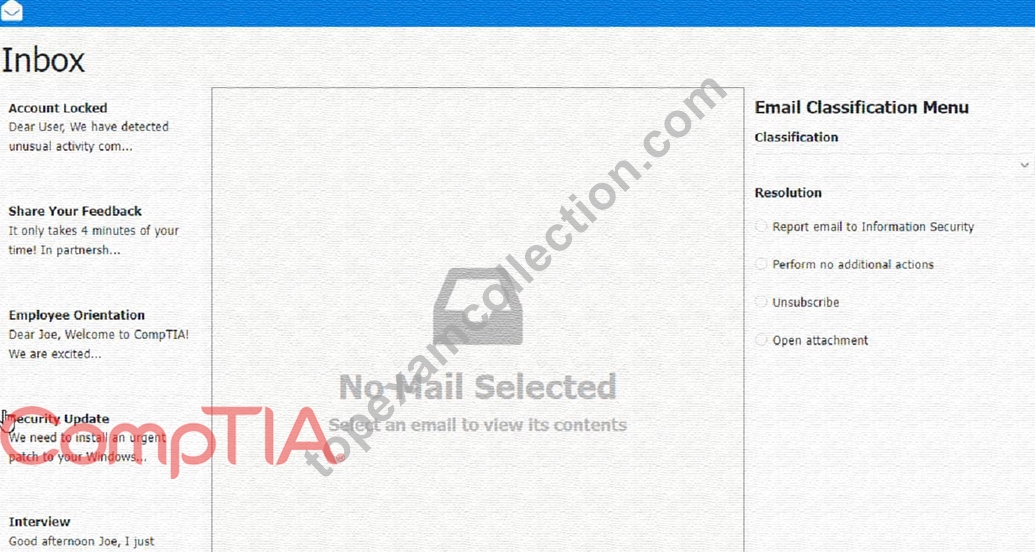
Answer:
Explanation:
See the Full solution in Explanation below.
Explanation:
Classification: a) Phishing
This email is a phishing attempt, as it tries to trick the user into clicking on a malicious link that could compromise their account or personal information. Some suspicious items in this email are:
* The email has a generic greeting and does not address the user by name.
* The email has spelling errors, such as "unusal" and "Locaked".
* The email uses a sense of urgency and fear to pressure the user into clicking on the link.
* The email does not match the official format or domain of the IT Help Desk at CompTIA.
* The email has two black bat icons, which are not related to CompTIA or IT support.
The appropriate resolution for this email is A. Report email to Information Security. The user should not click on the link, reply to the email, or provide any personal or account information. The user should forward the email to the Information Security team or use a professional email form to report the phishing attempt. The user should also delete the email from their inbox and trash folder.
The suspicious items to select are:
* b) From address
* d) Hyperlinks
These items indicate that the email is not from a legitimate source and that the link is potentially malicious.
The other items are not suspicious in this case, as the to address is the user's own email and there are no attachments.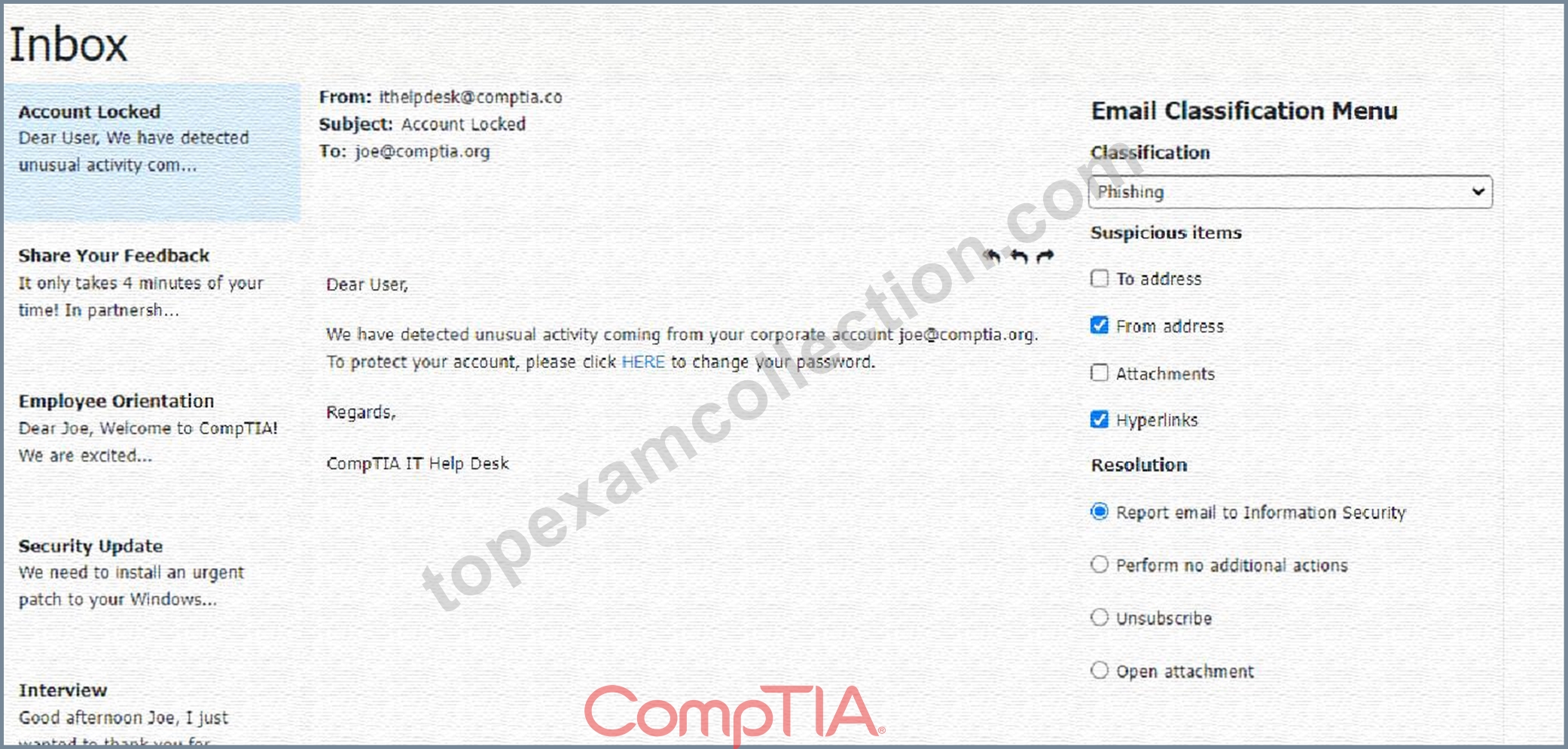
Classification: b) Spam
This email is a spam email, as it is an unsolicited and unwanted message that tries to persuade the user to participate in a survey and claim a reward. Some suspicious items in this email are:
* The email offers a free wireless headphone as an incentive, which is too good to be true.
* The email does not provide any details about the survey company, such as its name, address, or contact information.
* The email contains an external survey link, which may lead to a malicious or fraudulent website.
* The email does not have an unsubscribe option, which is required by law for commercial emails.
The appropriate resolution for this email is C. Unsubscribe. The user should look for an unsubscribe link or button at the bottom of the email and follow the instructions to opt out of receiving future emails from the sender. The user should also mark the email as spam or junk in their email client, which will help filter out similar emails in the future. The user should not click on the survey link, reply to the email, or provide any personal or financial information.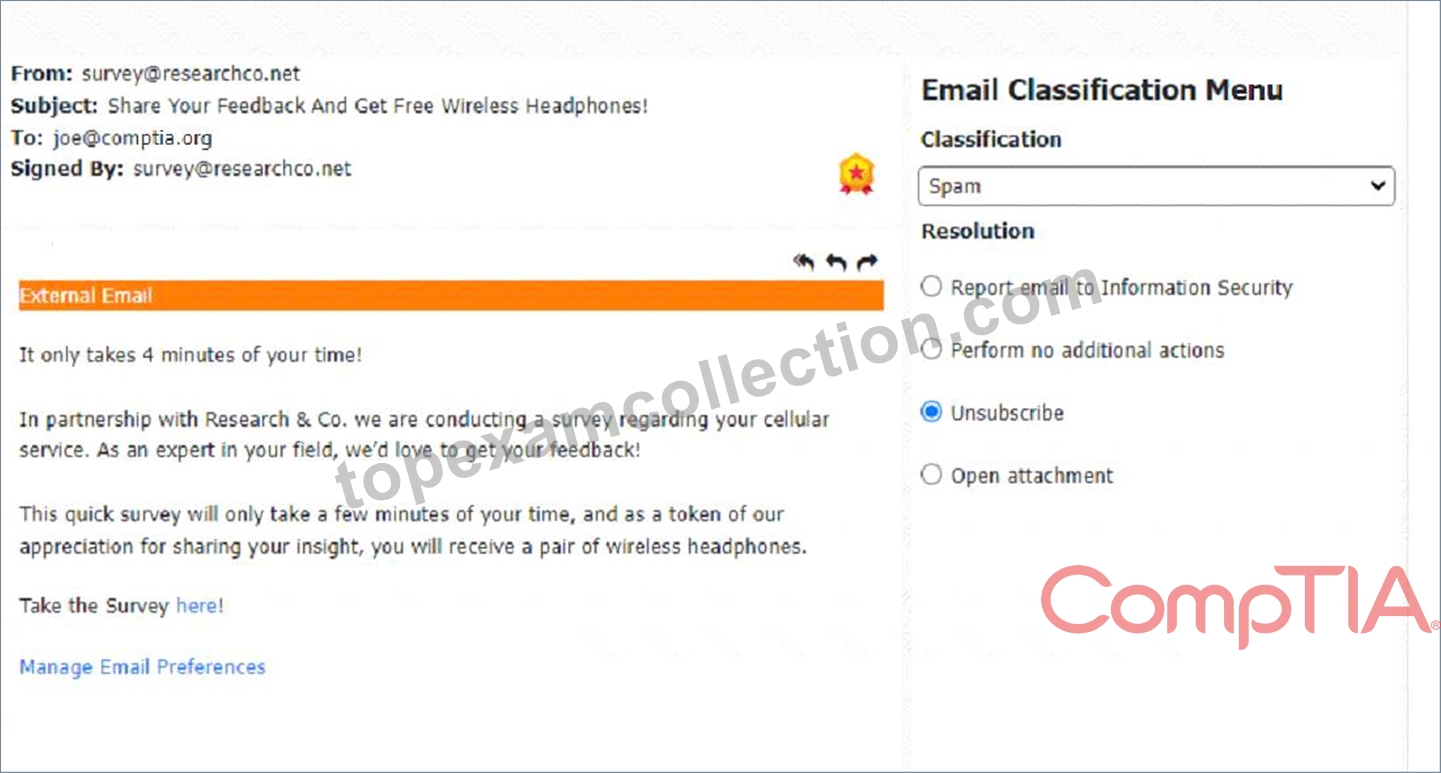
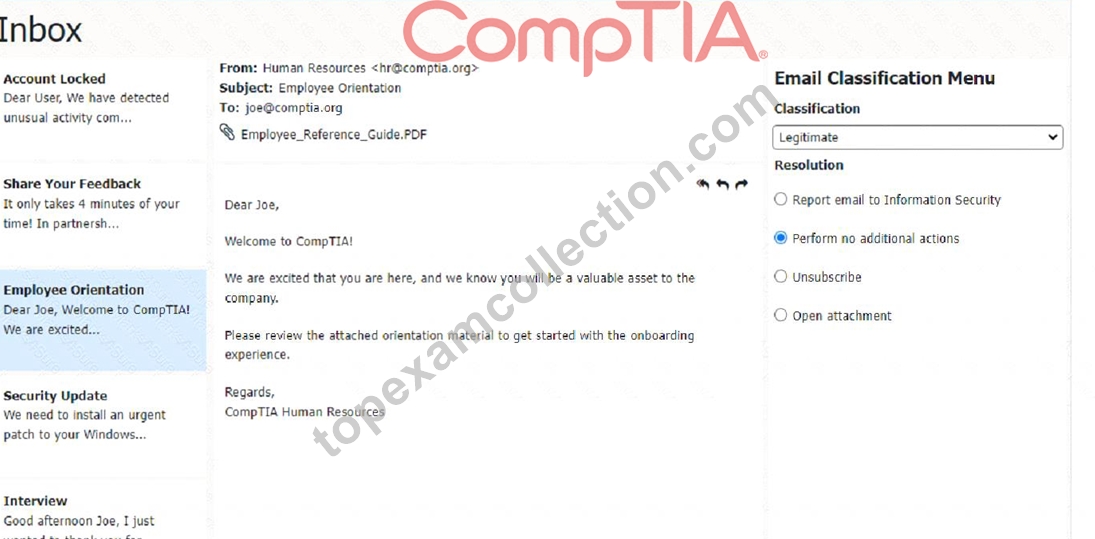
Classification: c) Legitimate
This email is a legitimate email, as it is from a trusted source and has a valid purpose. There are no suspicious items in this email, as the from address, the to address, the attachment, and the email body are all consistent and relevant. The appropriate resolution for this email is B. Perform no additional actions. The user can open the attachment and review the orientation material as instructed. The user does not need to report, unsubscribe, or delete this email.
A screenshot of a computer Description automatically generated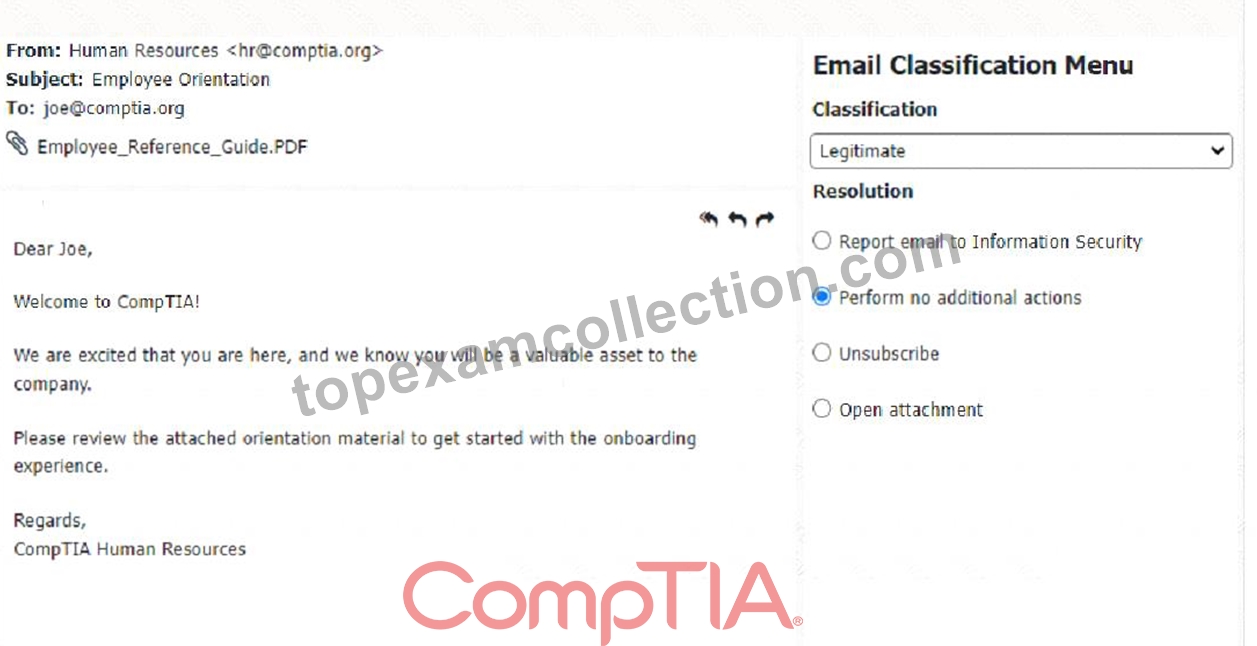
Classification: a) Phishing
This email is a phishing attempt, as it tries to deceive the user into downloading and running a malicious attachment that could compromise their system or data. Some suspicious items in this email are:
* The email has a generic greeting and does not address the user by name or username.
* The email has an urgent tone and claims that a security patch needs to be installed immediately.
* The email has an attachment named "patch1.exe", which is an executable file that could contain malware or ransomware.
* The email does not match the official format or domain of CompTIA Information Security.
The appropriate resolution for this email is A. Report email to Information Security. The user should not open the attachment, reply to the email, or provide any personal or account information. The user should forward the email to the Information Security team or use a professional email form to report the phishing attempt. The user should also delete the email from their inbox and trash folder.
A screenshot of a computer Description automatically generated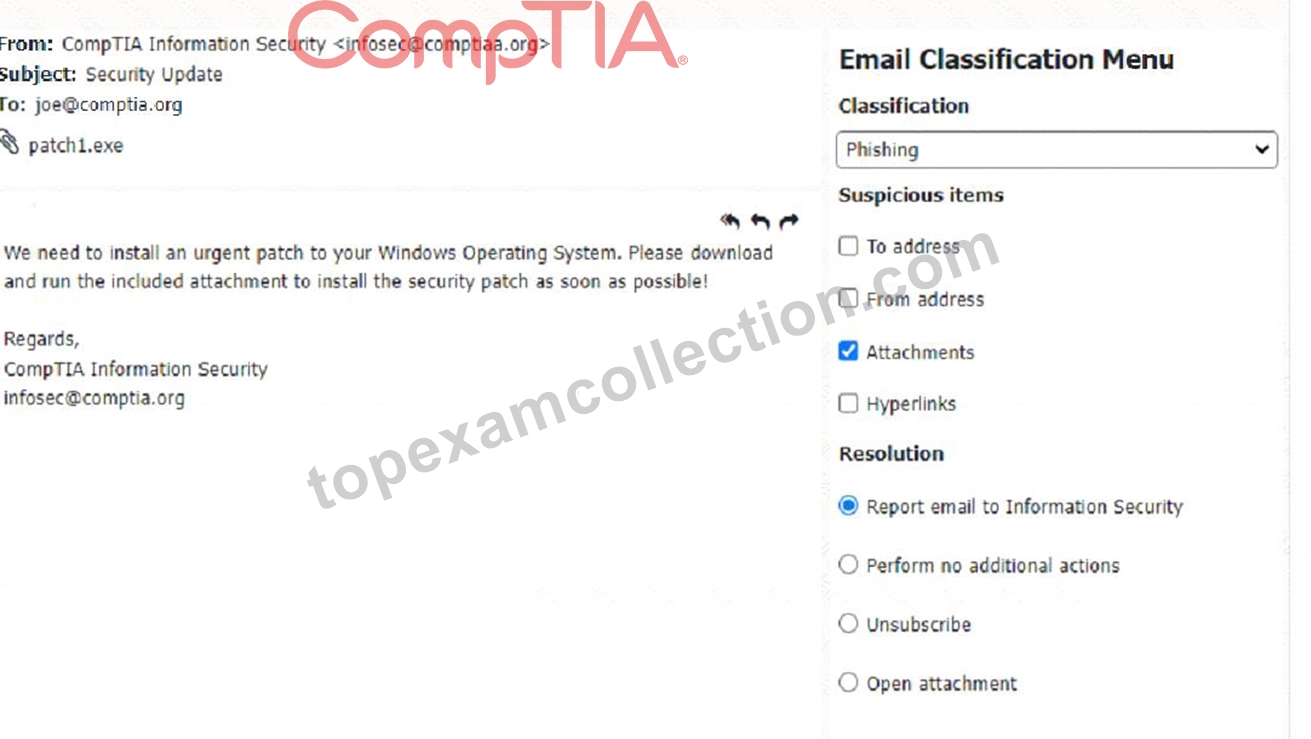
Classification: c) Legitimate
This email is a legitimate email, as it is from a trusted source and has a valid purpose. There are no suspicious items in this email, as the from address, the to address, and the email body are all consistent and relevant. The appropriate resolution for this email is B. Perform no additional actions. The user can reply to the email and thank the sender for the interview opportunity. The user does not need to report, unsubscribe, or delete this email.
A screenshot of a computer Description automatically generated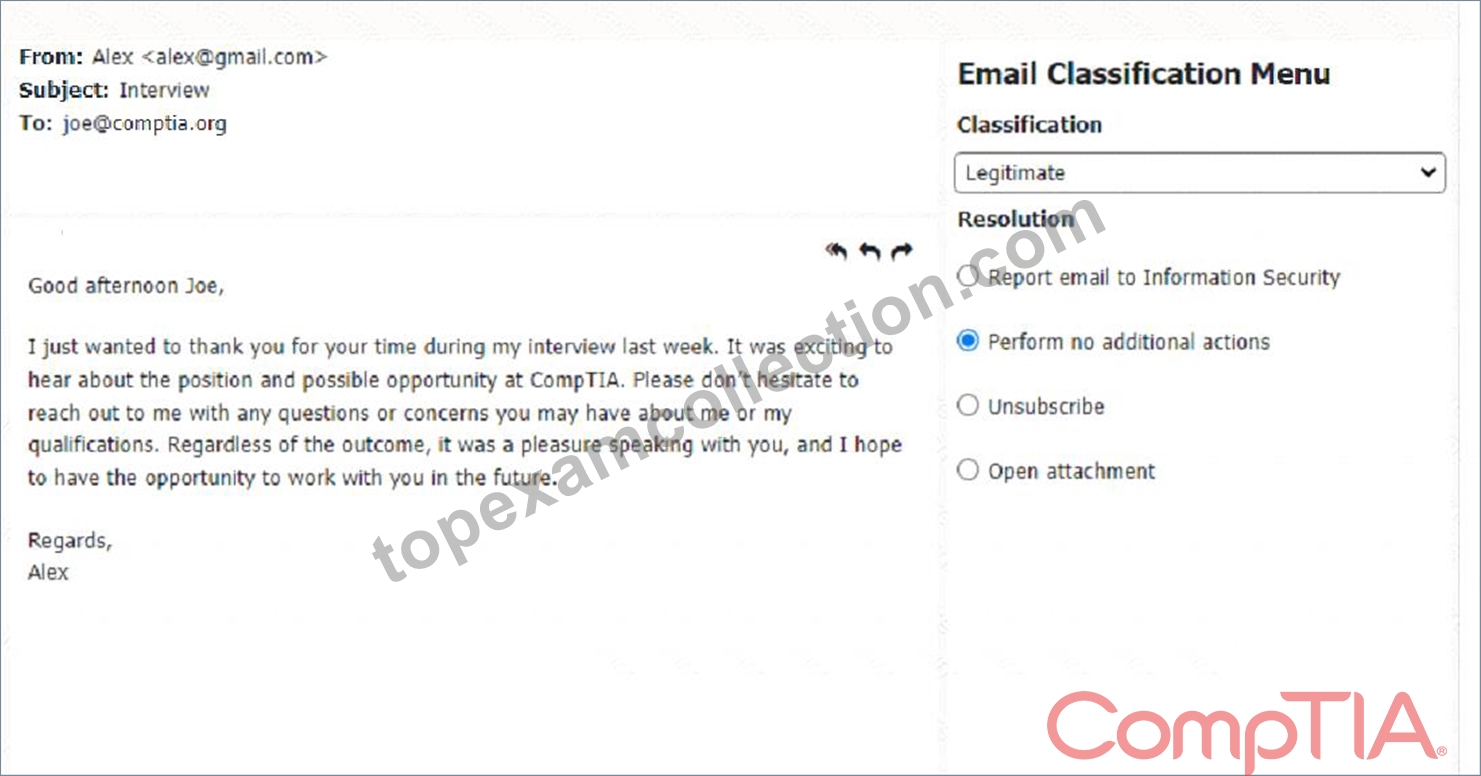
NEW QUESTION # 244
An employee using an Apple MacBook is receiving frequent, random pop-up requests from other Apple devices wanting to share photos and videos and asking whether the user would like to accept the request Which of the following configurations should the technician advise the user to change first"?
- A. AirDrop
- B. Wi-Fi
- C. Antivirus
- D. iCloud
Answer: A
NEW QUESTION # 245
A technician needs to track evidence for a forensic investigation on a Windows computer. Which of the following describes this process?
- A. Material safety data sheet
- B. Valid license
- C. Chain of custody
- D. Data retention requirements
Answer: C
Explanation:
In forensic investigations, maintaining the integrity of the evidence is crucial. The chain of custody is a process that ensures that evidence has been collected, preserved, and transferred in a manner that is legally defensible.
Valid license: Refers to software licensing, irrelevant in this context.
Data retention requirements: Policies for how long data should be kept, but not specifically related to tracking forensic evidence.
Material safety data sheet: Documentation for handling hazardous materials, not applicable here.
Chain of custody: The correct process for documenting the handling and transfer of evidence to maintain its integrity and admissibility in court.
NEW QUESTION # 246
Which of the following protects a mobile device against unwanted access when it is left unattended?
- A. OS updates
- B. PIN code
- C. BYOD policy
- D. Antivirus software
Answer: B
Explanation:
A PIN code is a numeric password that protects a mobile device against unwanted access when it is left unattended. It requires the user to enter the correct code before unlocking the device. OS updates, antivirus software and BYOD policy are other security measures for mobile devices, but they do not prevent unauthorized access when the device is left unattended. Verified References: https://www.comptia.org/blog
/mobile-device-security https://www.comptia.org/certifications/a
NEW QUESTION # 247
Which of the following defines the extent of a change?
- A. Purpose
- B. Impact
- C. Scope
- D. Analysis
Answer: A
Explanation:
The term that defines the extent of a change is scope. Scope is a measure of the size, scale and boundaries of a project or an activity. Scope defines what is included and excluded in the project or activity, such as goals, requirements, deliverables, tasks and resources. Scope helps determine the feasibility, duration and cost of the project or activity. Scope also helps manage the expectations and needs of the stakeholders involved in the project or activity. Purpose is the reason or objective for doing a project or an activity. Purpose defines why the project or activity is important or necessary, such as solving a problem, meeting a need or achieving a goal. Purpose helps provide direction, motivation and justification for the project or activity. Analysis is the process of examining, evaluating and interpreting data or information related to a project or an activity.
Analysis helps identify, understand and prioritize issues, risks, opportunities and solutions for the project or activity. Impact is the effect or outcome of a project or an activity on something or someone else. Impact defines how the project or activity affects or influences other factors, such as performance, quality, satisfaction or value. Impact helps measure the success and effectiveness of the project or activity.
References: CompTIA A+ Core 2 (220-1002) Certification Exam Objectives Version 4.0, Domain 5.2
NEW QUESTION # 248
A technician is investigating an employee's smartphone that has the following symptoms
* The device is hot even when it is not in use.
* Applications crash, especially when others are launched.
* Certain applications, such as GPS, are in portrait mode when they should be in landscape mode.
Which of the following can the technician do to MOST likely resolve these issues with minimal impact? (Select TWO).
- A. Reinstall the applications that have crashed.
- B. Perform a factory reset
- C. Close unnecessary applications
- D. Update the device's operating system
- E. Activate airplane mode.
- F. Turn on autorotation
Answer: C,F
Explanation:
The technician can close unnecessary applications and turn on autorotation to resolve these issues with minimal impact. Autorotation can help the device to switch between portrait and landscape modes automatically. Closing unnecessary applications can help to free up the device's memory and reduce the device's temperature1 Reference:
CompTIA A+ Certification Exam: Core 2 (220-1102) Exam Objectives Version 4.0. Retrieved from https://partners.comptia.org/docs/default-source/resources/comptia-a-220-1102-exam-objectives-(3-0)
NEW QUESTION # 249
A user's mobile phone battery does not last long and navigation is very slow. Which of the following should the technician do first to resolve the issue?
- A. Update the mobile OS
- B. Disable network services
- C. Uninstall unused programs
- D. Check running applications
Answer: D
Explanation:
The first step is to check running applications (Option B). Applications running in the background could consume a lot of battery and processing power, causing slow performance and battery drain. By identifying and closing or uninstalling these apps, the technician can resolve the issue more effectively.
* Uninstalling unused programs (Option A) might help, but checking active applications is more immediate.
* Updating the mobile OS (Option C) can improve performance but is not the first step in this scenario.
* Disabling network services (Option D) might help reduce battery drain but does not address potential app-related issues.
CompTIA A+ Core 2 References:
* 3.4 - Troubleshoot common mobile OS and application issues, including battery and performance concerns.
NEW QUESTION # 250
A customer recently experienced a power outage at a SOHO. The customer does not think the components are connected properly. A print job continued running for several minutes after the power failed, but the customer was not able to interact with the computer. Once the UPS stopped beeping, all functioning devices also turned off. In case of a future power failure, the customer wants to have the most time available to save cloud documents and shut down the computer without losing any data.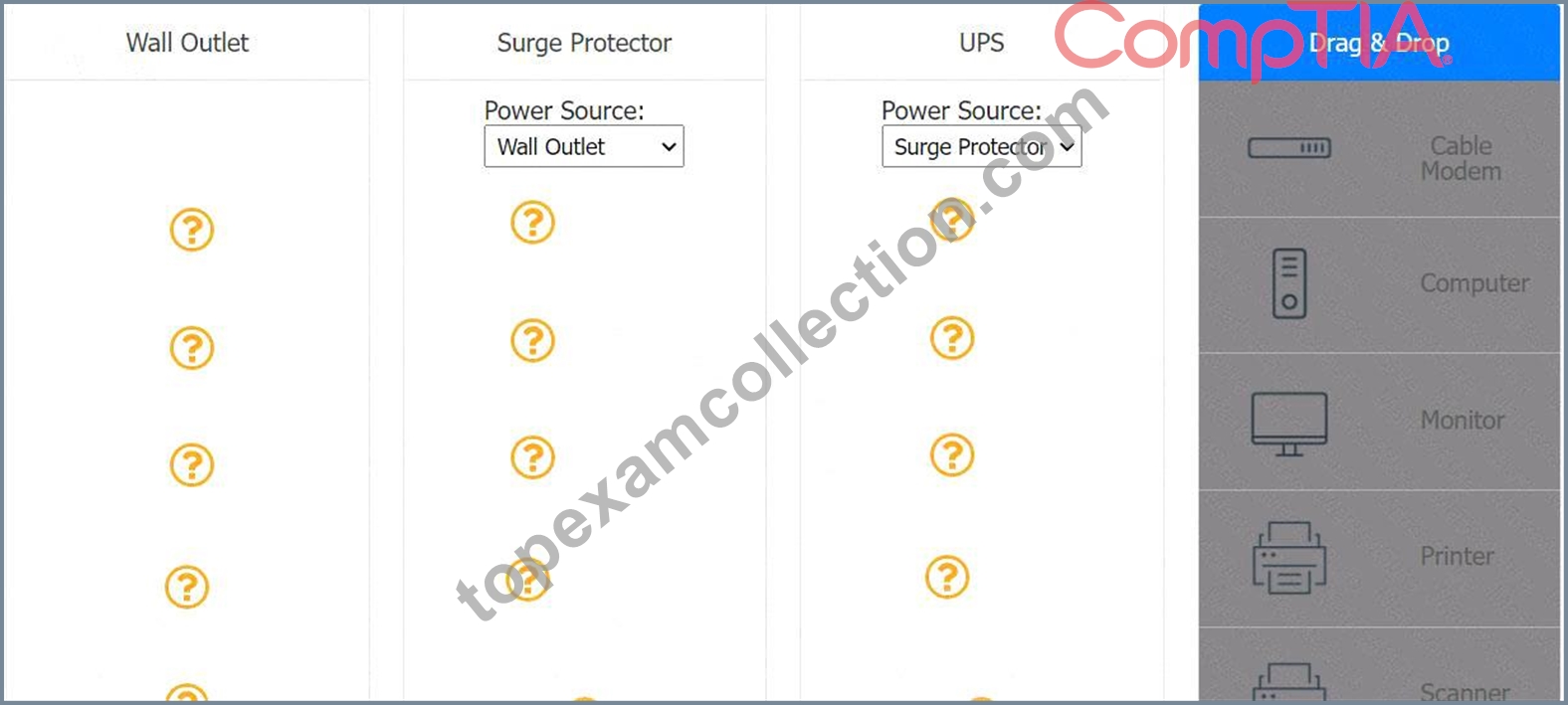
Answer:
Explanation: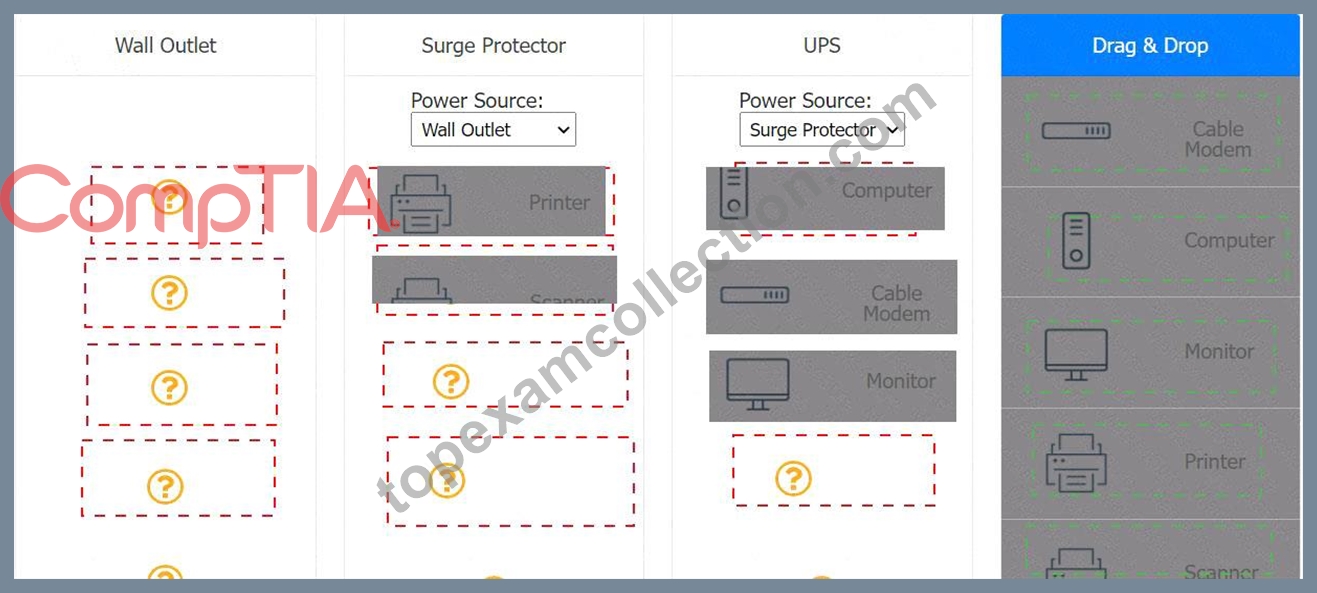
Explanation:
UPS > Surge protector = Computer, wifi router, cable modem
Surge protector = wallOutlet , printer and scanner
NEW QUESTION # 251
A technician thinks that a computer on the network has been infected with malware. The technician attempts several times to use a malware removal tool, but the issue persists. Which of the following should the technician do next?
- A. Reboot the computer into safe mode
- B. Use system recovery to prevent further infection
- C. Purchase a new endpoint protection tool
- D. Restore the computer from the last known-good backup
Answer: A
Explanation:
Rebooting the computer into safe mode (Option B) limits the processes and services that run, which can help in isolating and removing persistent malware that might be hiding in normal mode. Safe mode provides a cleaner environment to troubleshoot and remove malware.
Restoring from a backup (Option A) may work but should be considered after attempts to clean the infection.
Purchasing a new endpoint protection tool (Option C) is unnecessary at this stage since existing tools can be run in safe mode.
Using system recovery (Option D) could potentially remove the infection, but it's a more drastic step that may not be necessary yet.
CompTIA A+ Core 2 Reference:
3.3 - Best practices for malware removal, including booting into safe mode
NEW QUESTION # 252
Which of the following should be used to secure a device from known exploits?
- A. Cross-site scripting
- B. Encryption
- C. Operating system updates
- D. Remote wipe
Answer: C
Explanation:
Explanation
Operating system updates are used to secure a device from known exploits. Operating system updates are patches or fixes that are released by the vendor to address security vulnerabilities, bugs, or performance issues.
Operating system updates can also provide new features or enhancements to the device. It is important to keep the operating system updated to prevent attackers from exploiting known flaws or weaknesses.
NEW QUESTION # 253
Which of the following environmental factors are most important to consider when planning the configuration of a data center? (Select two).
- A. Noise levels
- B. Temperature levels
- C. Location of the servers
- D. Humidity levels
- E. Cable management
- F. Lighting levels
Answer: B,D
Explanation:
Explanation
Temperature and humidity levels are the most important environmental factors to consider when planning the configuration of a data center, as they directly affect the performance, reliability, and energy efficiency of the IT equipment. Excessive heat or moisture can cause overheating, corrosion, condensation, or static electricity, which can damage the hardware and lead to data loss or service disruption. Therefore, data centers need to monitor and control the temperature and humidity levels within the recommended ranges by using various cooling systems, airflow management, and sensors12.
References: 1 5 Factors to Consider for Data Center Environmental
Monitoring(https://community.fs.com/blog/5-factors-to-consider-for-data-center-environmental-monitoring.html Center Environmental standards and Controls - DataSpan(https://dataspan.com/blog/data-center-environmental-standards/).
NEW QUESTION # 254
A user reports a workstation has been performing strangely after a suspicious email was opened on it earlier in the week. Which of the following should the technician perform FIRST?
- A. Run a virus scan.
- B. Escalate the ticket to Tier 2.
- C. Reimage the computer.
- D. Utilize a Windows restore point.
Answer: A
Explanation:
Explanation
https://partners.comptia.org/docs/default-source/resources/comptia-a-220-1102-exam-objectives-(3-0) When a user reports that their workstation is behaving strangely after opening a suspicious email, the first step a technician should take is to run a virus scan on the computer. This is because opening a suspicious email is a common way for viruses and malware to infect a computer. Running a virus scan can help identify and remove any infections that may be causing the computer to behave strangely.
NEW QUESTION # 255
A technician is setting up a printer on a Linux workstation. Which of the following commands should the technician use to set the default printer?
- A. Ipstat
- B. Ispool
- C. Ipoptions
- D. ipr
Answer: D
Explanation:
In Linux, thelpcommand is used to manage print jobs, including setting the default printer. Thelpcommand allows users to send print jobs to a printer queue, check the status of print jobs, and cancel print jobs, among other functionalities. By using options and parameters with thelpcommand, a technician can specify a particular printer as the default for future print jobs, ensuring that documents are routed to the correct printer without needing to specify it each time.
NEW QUESTION # 256
A technician is troubleshooting a computer with a suspected short in the power supply. Which of the following is the FIRST step the technician should take?
- A. Place components on an ESD mat.
- B. Disconnect the power before servicing the PC.
- C. Put on an ESD strap
- D. Place the PC on a grounded workbench.
Answer: B
Explanation:
Explanation
The first step a technician should take when troubleshooting a computer with a suspected short in the power supply is B. Disconnect the power before servicing the PC. This is to prevent any electrical shock or damage to the components. A power supply can be dangerous even when unplugged, as capacitors can maintain a line voltage charge for a long time1. Therefore, it is important to disconnect the power cord and press the power button to discharge any residual power before opening the case2. The other steps are also important for safety and proper diagnosis, but they should be done after disconnecting the power.
NEW QUESTION # 257
......
CompTIA 220-1102 exam covers essential IT support topics such as operating systems, security, software troubleshooting, and operational procedures. 220-1102 exam is designed to validate the candidate's ability to install, configure, and maintain operating systems, troubleshoot software and hardware issues, and implement security best practices. Passing the exam demonstrates that the candidate has the necessary knowledge and skills to provide technical support and troubleshoot issues in a modern IT environment. 220-1102 exam is ideal for entry-level IT professionals, including help desk technicians, desktop support specialists, and field service technicians.
220-1102 Exam Dumps Pass with Updated 2025: https://www.topexamcollection.com/220-1102-vce-collection.html
Free 220-1102 Exam Dumps to Pass Exam Easily: https://drive.google.com/open?id=1h1320eeVhUSvf1M4ClhIOefRpuSDeZUD
