

Pass Microsoft Certified: AI Agent Builder Associate AB-620 exam [Sep 12, 2026] Updated 101 Questions
Microsoft AB-620 Actual Questions and 100% Cover Real Exam Questions
NEW QUESTION # 25
Note: This question is part of a series of questions that present the same scenario. Each question in the series contains a unique solution that might meet the stated goals. Some question sets might have more than one correct solution, while others might not have a correct solution.
After you answer a question in this section, you will NOT be able to return to it. As a result, these questions will not appear on the review screen.
A company is configuring an agent in Copilot Studio that uses a generative answers node inside multiple topics.
The company requires responses to meet the following requirements:
- Must use an executive summary format.
- Must apply only within a specific topic.
- Must continue using configured knowledge sources.
- Must comply with connector security controls.
You need to configure a custom prompt to meet the formatting requirements.
Solution: Add instructions in the custom prompt tool to restrict connector access during runtime.
Does the solution meet the goal?
- A. No
- B. Yes
Answer: A
Explanation:
Correct:
* Create a custom prompt tool in the specific topic that instructs the model to respond using an executive-summary structure.
To fulfill all the requirements in the best way, you must configure the custom instructions directly inside the specific Generative Answers node properties within that targeted topic.
By default, editing custom instructions at the global agent level or the Conversational boosting system topic applies globally. To scope formatting changes to only one topic while keeping configured data sources and security intact, you must override the instructions at the node level.
Incorrect:
* Add instructions in the custom prompt tool to restrict connector access during runtime.
* Configure the custom prompt tool at the topic level so that other topics are not affected.
* Remove the generative answers node and rely only on the custom prompt to produce formatted responses.
Reference:
https://learn.microsoft.com/en-us/microsoft-copilot-studio/nlu-boost-node
NEW QUESTION # 26
You run multiple evaluation tests for an agent in Copilot Studio before expanding user access.
You observe the following about the evaluation results:
Each evaluation case is reported as meeting or missing the expected response.
Some evaluation cases fail repeatedly across several runs.
Each run displays the expected response and the response generated by the agent.
You need to interpret what the evaluation results reveal.
What should you conclude based on each interpretation? To answer, select the appropriate options in the answer area.
NOTE: Each correct selection is worth one point.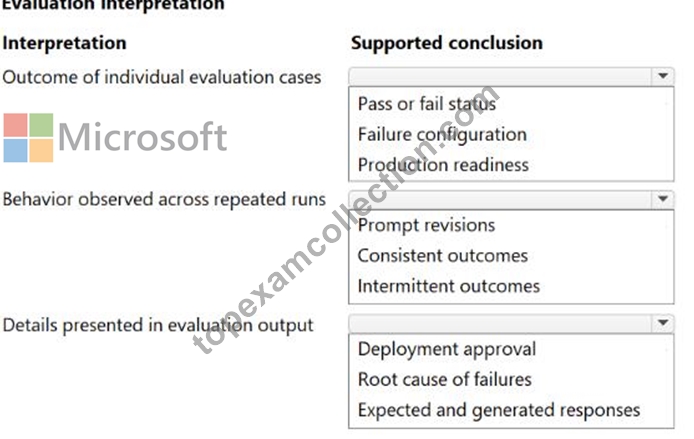
Answer:
Explanation: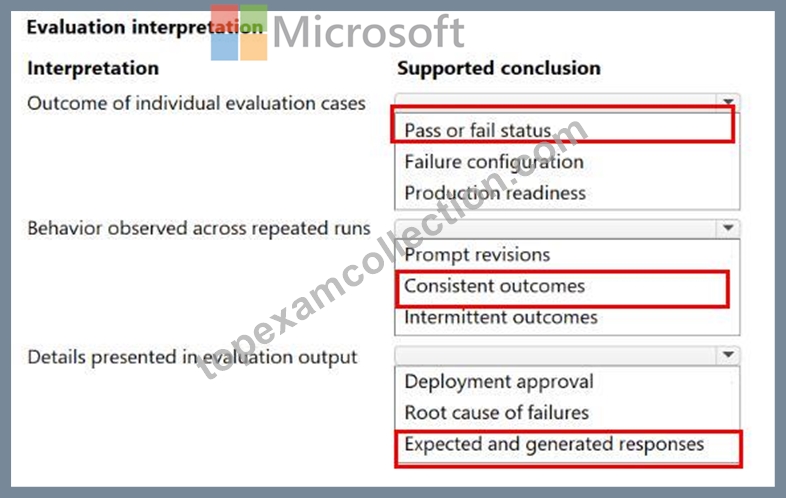
NEW QUESTION # 27
Drag and Drop Question
A company wants to extend an agent in Copilot Studio by calling an external REST API to retrieve and update data.
To meet the business needs, the REST API must be added following a correct dependency order.
You need to add a REST API to the agent so it can be invoked during conversations.
In which order should you perform the actions? To answer, move all actions from the list of actions to the answer area and arrange them in the correct order.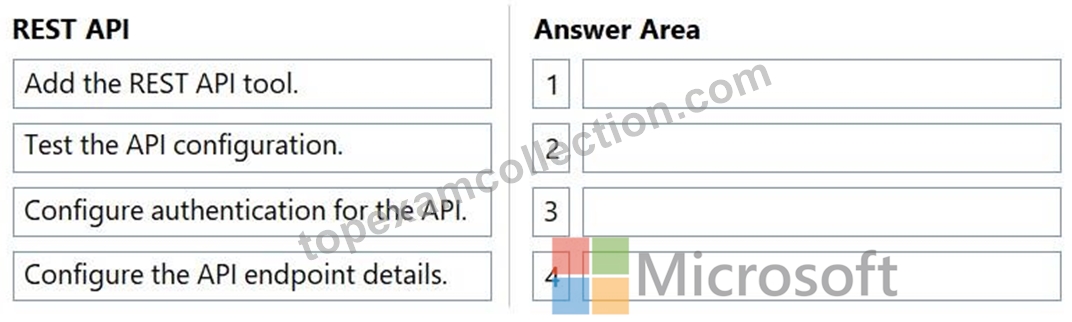
Answer:
Explanation: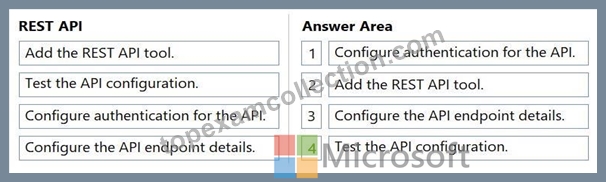
Explanation:
You must configure authentication and the API tool before you can successfully configure the endpoint details and test it.
To add an external REST API to an agent in Copilot Studio, you must follow this exact dependency order:
Step 1: Configure authentication for the API
Setup security credentials first.
This includes API keys or OAuth.
Without this, the connection will fail.
Security First: Copilot Studio requires a valid connection object to save and route endpoint requests.
Step 2: Add the REST API tool.
Import or create the action connector.
This registers the tool in Copilot.
Tool Registration: The agent needs to recognize the tool wrapper before you can customize its internal endpoint paths.
Step 3: Configure the API endpoint details.
Define specific paths and methods.
Map input and output parameters.
Step 4: Test the API configuration
Run validation checks in real-time.
Ensure data flows correctly.
Reference:
https://learn.microsoft.com/en-us/microsoft-copilot-studio/agent-extend-action-rest-api
NEW QUESTION # 28
A company is building an agent topic in Copilot Studio. The agent topic uses a generative answers node to respond to user questions based on authorized knowledge sources.
To meet the business needs, the generative answers node must meet the following requirements:
Use the user's message in the generative answers node.
Scope the topic node to query only designated data.
Restrict responses to approved enterprise data.
Answer:
Explanation:
NEW QUESTION # 29
Drag and Drop Question
A company is building a Copilot Studio solution that must answer policy questions, retrieve operational metrics from structured data, and execute authenticated updates in backend systems.
The company decides to use multiple specialized agents rather than a single monolithic agent.
Custom agents for each action already exist.
To meet the business needs, the solution must meet the following requirements:
- The solution must retrieve up to date metrics from structured data.
- The solution must answer policy questions using curated knowledge.
- The solution must execute authenticated updates during conversations.
You need to select the appropriate agent design for each requirement.
Which approach should you use for each requirement? To answer, move the appropriate configurations to the correct requirements. You may use each configuration once, more than once, or not at all. You may need to move the split bar between panes or scroll to view content.
NOTE: Each correct selection is worth one point.
Answer:
Explanation:
Explanation:
Box 1: Delegate the request to a tools-first agent
To retrieve up-to-date operational metrics from structured data in a multi-agent Copilot Studio architecture, you should configure the parent system to delegate the request to a tools-first agent.
Specialized Actions: In Copilot Studio, custom connectors and APIs that query or update structured data are configured as tools.
Dynamic Execution: A tools-first agent is specifically designed to evaluate the user's intent, select the correct authenticated API/connector (the tool), and pass parameters to retrieve real-time data.
Delegation Overlap: Knowledge-focused agents are optimized for RAG (retrieval-augmented generation) over static, unstructured files/documents rather than dynamic operational metrics.
Box 2: Delegate the request to a knowledge-focused agent.
To meet the requirement of answering policy questions using curated knowledge within a multi- agent Copilot Studio solution, you should delegate the request to a knowledge-focused agent.
Box 3: Delegate the request to a tools-first agent
To execute authenticated updates and actions in backend systems, you should delegate the request to a tools-first agent in Copilot Studio. While other specialized agents handle document synthesis or data analysis, a tools-first agent is configured to process API-based actions and plugins with proper end-user authentication.
In multi-agent architecture within Microsoft Copilot Studio, agents are typically categorized by their core operational focus. A tools-first agent is explicitly designed to prioritize taking specific actions-such as executing backend APIs, running plugins, or triggering workflows-making it the designated agent type for processing transactional and authenticated system updates.
Reference:
https://learn.microsoft.com/en-us/microsoft-copilot-studio/guidance/multi-agent-patterns
NEW QUESTION # 30
A company is integrating an agent in Copilot Studio into a custom application by using the Microsoft 365 Agents SDK.
The company has the following requirements for the application:
The deployment workflow must follow a dependency driven sequence.
The agent must be published before configuration values are retrieved.
End-to-end validation must occur before production deployment.
You need to plan the deployment workflow to integrate the agent.
In which order should you perform the actions? To answer, move all actions from the list of actions to the answer area and arrange them in the correct order.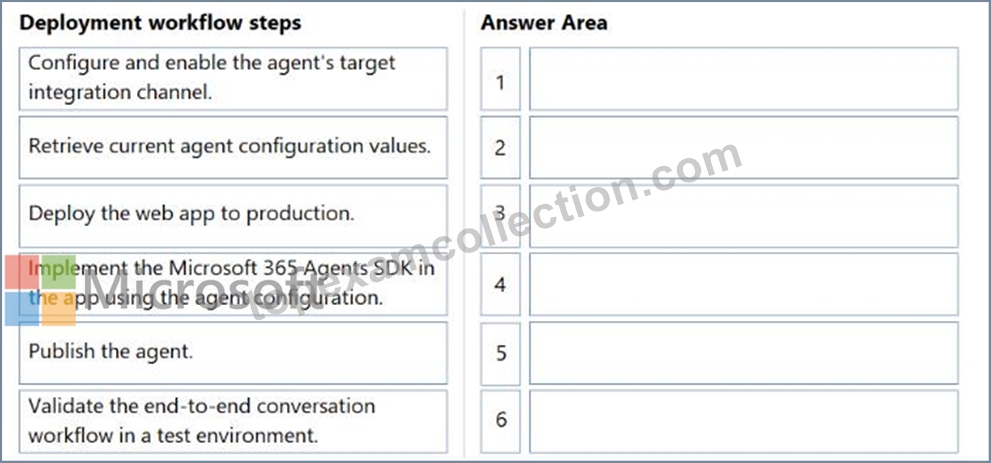
Answer:
Explanation: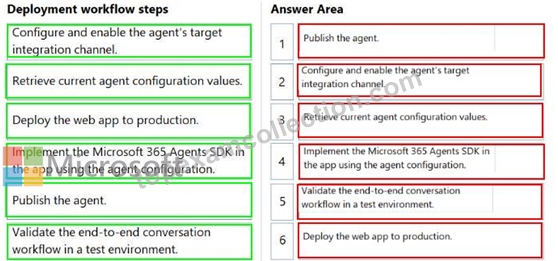
NEW QUESTION # 31
Case Study 1 - Blue Yonder Airlines
Background
Blue Yonder Airlines is a global carrier headquartered in Los Angeles, California, operating domestic and international flights. The company serves millions of passengers annually through its website, mobile app, and call centers. To improve customer service efficiency and reduce call center volume, Blue Yonder is deploying an AI agent in Microsoft Copilot Studio.
The agent will handle customer inquiries across multiple channels - web chat, mobile app, and Microsoft Teams (for internal support staff). It will answer questions, retrieve data from enterprise systems, and escalate to human agents when needed.
The project is led by a cross-function team:
- Product manager: Defines requirements and success metrics.
- Lead agent author: Designs topics, intents, and generative behavior.
- Flow designers: Build agent flows and integrations.
- IT/security and compliance: Oversees identity, data protection, and Responsible AI (RAI) compliance.
Current environment
Channels
Public website: Embedded web chat
Mobile app: In-app chatbot
Microsoft Teams: Internal support agent access
Identity and access
Customers: Anonymous access for general inquiries (e.g., flight status, baggage policy).
Authentication is required for personal data access (e.g., bookings, loyalty points).
Internal staff: Authenticate via Microsoft Entra ID.
Data sources
Reservation and Ticketing System (internal): REST API, no prebuilt connector with custom enterprise database.
Flight Status and Weather APIs (external): REST APIs with API keys.
Customer Support Knowledge Base: SharePoint library with PDFs and policy documents.
Loyalty Program Data: Stored in Dynamics 365 and Dataverse.
Travel Advisory Content: Uses REST API with partner services.
Integration mechanisms
Custom connectors must be used for internal APIs that lack prebuilt connectors.
HTTP request nodes may be used for lightweight external APIs.
Knowledge sources must be used for unstructured content.
Agent flows must be used to encapsulate reusable logic (e.g., rebooking).
Business requirements
Omnichannel support
Deploy the agent across web, mobile, and Teams with a consistent user experience. The Teams deployment must also support internal staff.
Self-service capabilities
The agent must handle common inquiries such as:
- Flight status
- Booking and rebooking
- Loyalty program questions
- Travel policies and baggage rules
Human escalation
If the agent cannot resolve an issue or the user requests help, it must:
- Escalate to a human agent.
- Transfer the conversation transcript and relevant context.
- Redact any sensitive personal data before escalation.
Knowledge integration
The agent must use scalable methods for knowledge integration and must not rely on manually authored Q&A topics for each document.
Performance metrics
First-contact resolution: +25%
Tier-1 call deflection: ≥20%
Response time: 90% of queries answered within 30 seconds
Accuracy: ≥95% for known FAQs
CSAT: ≥85% for AI-handled interactions
Technical requirements
Platform constraints
No custom code is permitted; only Copilot Studio's built-in tools may be used.
All backend logic must be implemented using agent flows.
Markdown must be used for formatting (e.g., bold, bullet points); HTML is not supported.
Authentication
Sign-in is required for personal data access.
Anonymous access is allowed for general inquiries.
User identity must be used for data access; shared or builder credentials must not be used.
Compliance and security
Power Platform DLP policies must be enforced to block unauthorized data flows.
Responsible AI content moderation filters must be enabled.
Prompt modifications must be added to enforce tone, disclaimers, and refusal behavior.
Disclaimers must be applied consistently across all generative responses. Manual edits to individual topics must be avoided.
Monitoring and maintenance
All conversations and actions must be logged for auditing.
Weekly reviews of transcripts and metrics must be conducted.
Topics, flows, and knowledge sources must be updated as policies or systems evolve.
Issues and constraints
API rate limits: External APIs (e.g., flight status) have usage limits. Agent flows must handle retries and caching to avoid exceeding quotas.
Knowledge base limits: Copilot Studio has limits on the number and size of indexed documents.
Large files must be split or summarized.
Generative answer risks: Generative responses must be constrained to avoid policy violations.
Prompt modifications and filters must be used to enforce tone, safety, and compliance.
User input variability: Users phrase questions in diverse ways. Topics must include varied trigger phrases and fallback handling.
Authentication UX: The agent must clearly explain when sign-in is required and handle transitions smoothly across channels.
Problem statement
Blue Yonder Airlines must deploy a secure, scalable, and policy-compliant AI agent using Microsoft Copilot Studio. The agent must deliver accurate, helpful, and safe responses across multiple channels, integrate with enterprise systems, and support both anonymous and authenticated users. It must adhere to strict data protection and Responsible AI standards while improving customer service efficiency and satisfaction.
You need to configure the agent in Copilot Studio to use internal and external partner knowledge sources to answer user questions about the airline services.
Which two actions should you perform? Each correct answer presents part of the solution.
NOTE: Each correct selection is worth one point.
- A. Add the internal policy documents as a knowledge source.
- B. Enable unrestricted web search for the agent.
- C. Write individual Q&A pairs for each document as separate topics.
- D. Use a Microsoft Graph connector to index the partner's travel advisory content.
Answer: A,D
Explanation:
[A] External
Scenario:
Data sources include:
Travel Advisory Content: Uses REST API with partner services.
Configuring a Microsoft Graph connector to index your external data and utilizing REST APIs are highly effective and distinct strategies for supplying knowledge and actions in Microsoft Copilot Studio.
[D] Internal
Scenario:
The agent will handle customer inquiries across multiple channels - web chat, mobile app, and Microsoft Teams (for internal support staff). It will answer questions, retrieve data from enterprise systems, and escalate to human agents when needed.
Data sources include: Customer Support Knowledge Base: SharePoint library with PDFs and policy documents.
Reference:
https://learn.microsoft.com/en-us/microsoft-copilot-studio/knowledge-copilot-connectors
NEW QUESTION # 32
An agent must escalate to a live human agent when it cannot resolve a customer issue, and hand off full conversation context. Which node should you add to the topic?
- A. Escalate to a live agent (handoff) node
- B. End of conversation node
- C. Redirect to another topic node
- D. Adaptive card node
Answer: A
NEW QUESTION # 33
Users can add content to a paragraph field in a team-managed project, but they cannot @mention other users.
Identify the cause.
- A. Notification settings
- B. Project permissions
- C. Field settings
- D. Screen settings
- E. Global permissions
- F. Issue-level security settings
Answer: E
NEW QUESTION # 34
You need an agent to only be invoked by other trusted agents in the tenant, not directly by end users. What should you configure?
- A. Enable anonymous authentication
- B. Publish the agent to the public web channel
- C. Configure the agent as a connected agent without exposing a standalone chat channel
- D. Increase the token limit
Answer: C
Explanation:
Configuring an agent as a connected agent (invoked by an orchestrating agent) without publishing a standalone end-user channel restricts its use to agent-to-agent delegation.
NEW QUESTION # 35
You run the same fixed test set three times in Copilot Studio.
During evaluation, you observe the following:
The same interaction fails in all three runs.
Score values range from 0.58 to 0.61.
The reasoning states that the response partially matches the expected answer.
The knowledge source that is used is internal documentation.
No tools are invoked.
Answer:
Explanation:
NEW QUESTION # 36
A company has agents in Copilot Studio.
The company needs to prevent the agents from using disallowed connectors and insecure data flows. Administrators must be able to enforce the governance controls to prevent and report violations.
You need to enforce governance controls for agents.
What should you do?
- A. Configure data policies.
- B. Review agent analytics to detect risky connector usage.
- C. Configure Application Insights to collect runtime telemetry.
- D. Review security FAQs to understand default protections.
Answer: A
Explanation:
Comprehensive and Detailed Explanation From Microsoft AB-620 Study Guide: Power Platform data policies are the preventive governance control for connectors, HTTP endpoints, knowledge sources, and combinations of data groups used by Copilot Studio agents. Administrators can classify or block connectors, restrict endpoint use, require authentication, and surface policy violations during authoring or publishing. This meets both enforcement and reporting requirements. Application Insights records runtime telemetry but does not prevent a maker from adding a disallowed connector. Security FAQs provide guidance only. Agent analytics can reveal behavior and usage trends but are detective, not an administrative guardrail. Data policies should be scoped deliberately at tenant or environment level and tested against representative agent configurations. When a violation occurs, Copilot Studio can block publishing and provide downloadable details identifying the policy conflict, enabling the administrator and maker to correct the design. Governance should also include least-privilege connections, environment segmentation, solution-based ALM, and review of exceptions; a broadly permissive policy followed by manual monitoring is not equivalent to enforcing the control at design and deployment time. Study Guide alignment: Plan and configure agent solutions > Plan an agent solution > Evaluate security and governance considerations.
NEW QUESTION # 37
An agent uses a flow that calls an external service which can occasionally fail or time out.
When a failure occurs, the agent must meet the following requirements:
Must not terminate silently.
Must send a notification containing the error details.
You need to configure the agent flow so that failures are handled in a controlled and predictable way.
Solution: Configure run after conditions for failure paths.
Does the solution meet the goal?
- A. No
- B. Yes
Answer: B
Explanation:
Comprehensive and Detailed Explanation From Microsoft AB-620 Study Guide: Configure run after is the control that routes execution to an error-handling action when the external-service action fails, times out, is skipped, or reaches another selected status. By configuring the notification action to run after failure and timeout, the flow no longer terminates silently and can send a message containing sanitized error context. The handler can then set a deliberate flow status, record a correlation ID, and provide the operator with the failed action and remediation path. This design should be paired with an appropriate retry policy based on whether the external operation is safe to repeat. For non-idempotent writes, automatic retry may create duplicates and should generally be disabled or protected with an idempotency key. Error notifications must not include tokens, secrets, or unrestricted payloads. Testing should deliberately produce an authorization failure, timeout, and service error to prove that each status enters the handler and that the notification itself has a fallback if its connector is unavailable. Study Guide alignment: Plan and configure agent solutions > Create and monitor agent flows in Copilot Studio > Implement error handling in agent flows.
NEW QUESTION # 38
A team uses environment variables to separate configuration from an agent so that the same solution can be moved between environments.
The team requires the following scenarios to be addressed:
An administrator updates a sensitive configuration value and needs the change to take effect at runtime without republishing the agent.
A builder needs to confirm a configuration value but must not be able to modify it from Copilot Studio.
An administrator updates a non-secret configuration value and needs the updated value to be used by the published agent at runtime.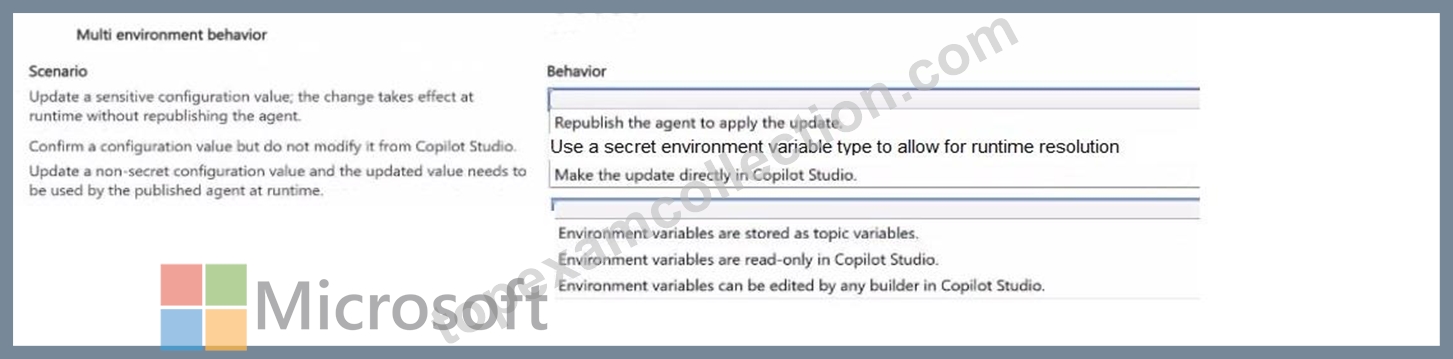
Answer:
Explanation: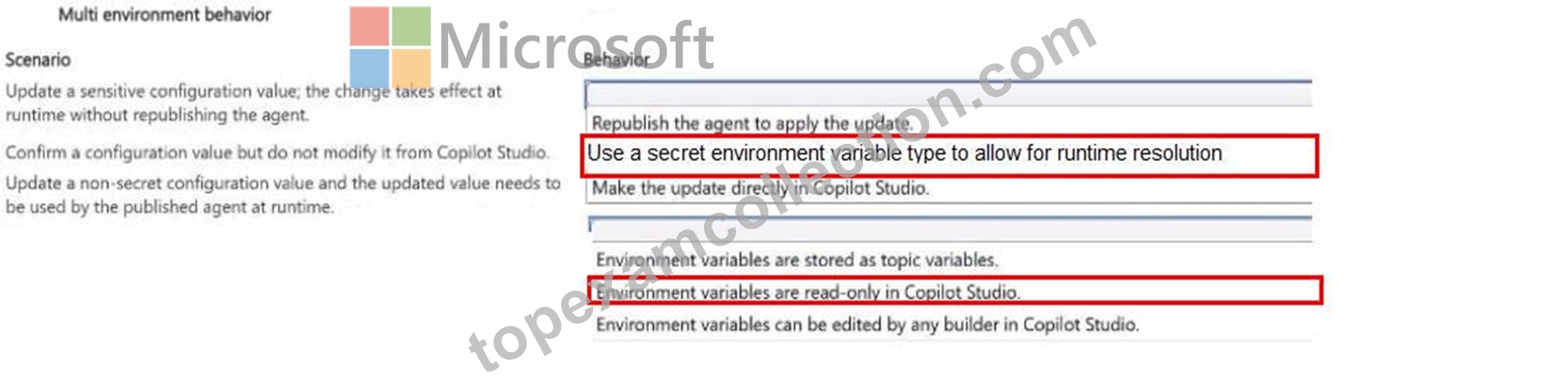
NEW QUESTION # 39
Drag and Drop Question
A company uses an agent in Copilot Studio in production and requires centralized monitoring for operational visibility and troubleshooting.
The team decides to use Application Insights as the monitoring solution.
An agent activity is not included in the monitoring data.
You need to enable monitoring the agent by using Application Insights.
Which four actions should you perform in sequence? To answer, move the appropriate actions from the list of actions to the answer area and arrange them in the correct order.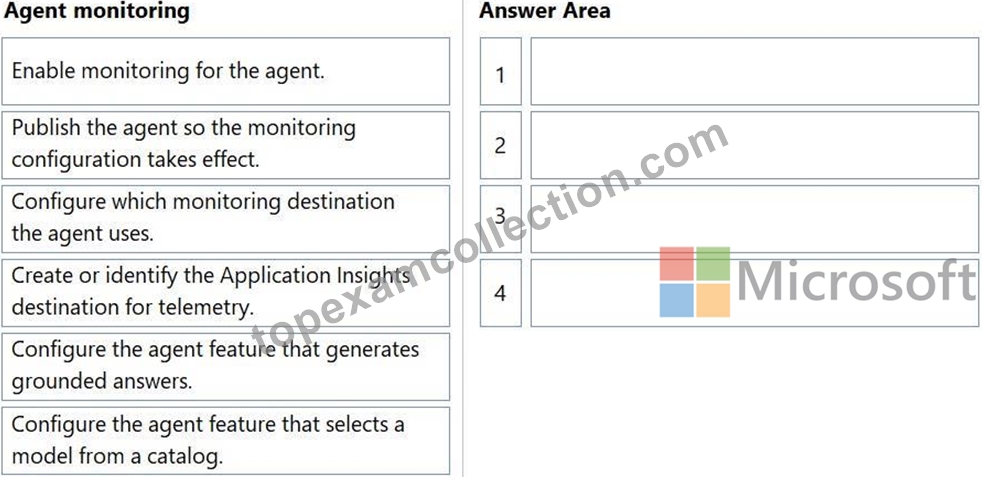
Answer:
Explanation: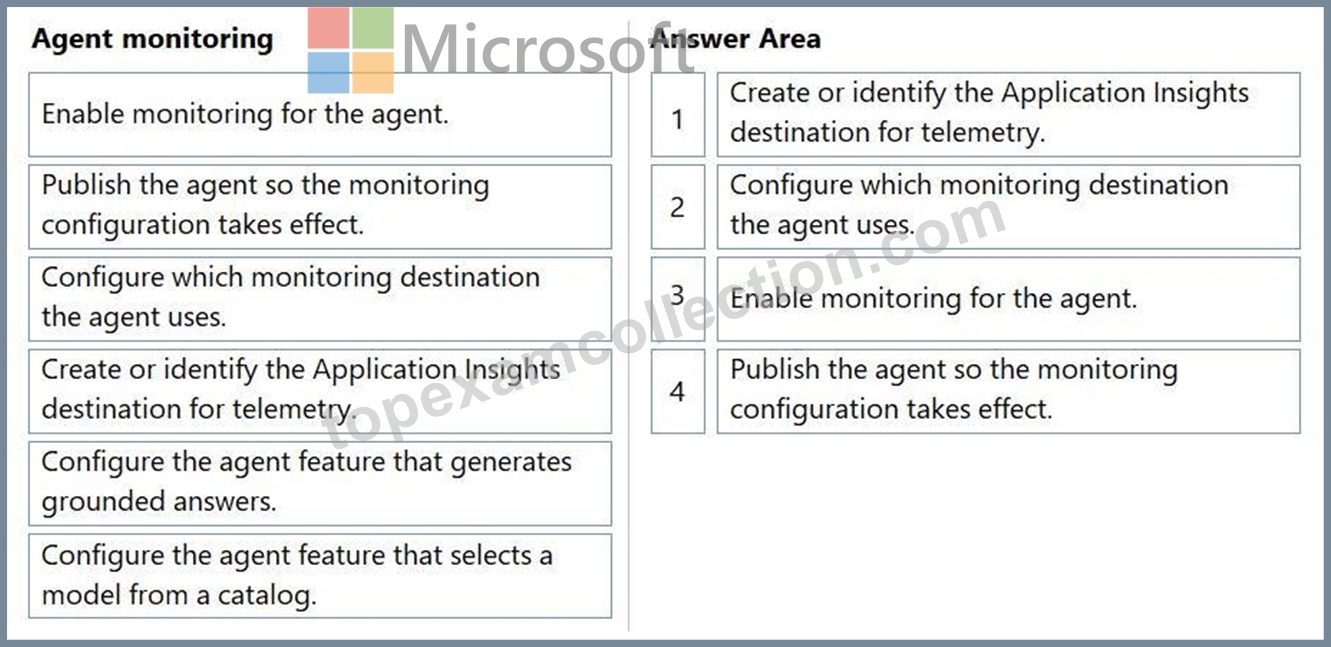
Explanation:
Step 1: Create or identify the Application Insights destination for telemetry You need an active Azure Application Insights resource.
You must copy its Connection String or Instrumentation Key.
Step 2: Configure which monitoring destination the agent uses
Paste the copied connection string into the agent's advanced settings.
Step 3: Enable monitoring for the agent
Toggle the monitoring feature to "On" within the agent's configuration panel.
Step 4: Publish the agent so the monitoring configuration takes effect
Changes do not apply to production until the agent is published.
Publishing pushes the telemetry setup to the live environment.
Reference:
https://learn.microsoft.com/en-us/microsoft-copilot-studio/advanced-bot-framework-composer-capture-telemetry
NEW QUESTION # 40
A company uses an agent in Copilot Studio to answer questions based on enterprise content.
The content is indexed in Azure AI Search. Responses must be generated by a Microsoft Foundry model.
To meet the business needs, the solution must meet the following requirements:
Users must be able to trace each answer back to its source.
The agent must retrieve information from a centralized data index.
Responses must be generated by an enterprise-approved foundation model.
You need to configure generative answers for the agent.
What should you configure for each requirement? To answer, move the appropriate configurations to the correct requirements. You may use each configuration once, more than once, or not at all.
NOTE: Each correct selection is worth one point.
Answer:
Explanation:
NEW QUESTION # 41
A team is standardizing ALM for agents in Copilot Studio.
The team requires a custom solution that includes agents. The solution must support ALM scenarios, such as managing and transporting agent assets across environments and pipeline deployments.
You need to create an ALM-ready custom solution in Copilot Studio.
What should you do?
- A. Export the custom solution as a managed solution and import it into production.
- B. Export the agent directly and then import it into another environment.
- C. Publish the agent to a channel and use that channel configuration as the ALM container.
- D. Create a new custom solution from the Solutions area.
Answer: D
Explanation:
Comprehensive and Detailed Explanation From Microsoft AB-620 Study Guide: The required first action is to create a custom solution from the Solutions area. A solution is the ALM carrier that groups the agent with its related components and enables controlled export, import, pipeline deployment, dependency management, and versioning across environments. Exporting an agent directly is not the supported replacement for solution-based ALM. A channel configuration determines where users can interact with a published agent; it is not a container for development assets. Exporting a managed solution and importing it into production is a later release step and cannot occur until the custom solution exists and contains the agent and its dependencies. After creation, the team should add the existing agent, associated flows, connection references, environment-variable definitions, prompts, and any other required components. Development normally occurs in an unmanaged solution, while a managed build is deployed to Test and Prod. This separation supports repeatable promotion, protects downstream environments from unmanaged edits, and provides a clearer rollback and support boundary. Study Guide alignment: Test and manage agents > Implement application lifecycle management for agents in Copilot Studio > Create a solution.
NEW QUESTION # 42
......
Microsoft AB-620 Real 2026 Braindumps Mock Exam Dumps: https://www.topexamcollection.com/AB-620-vce-collection.html
